Map the first-run experience
For small teams and the agents beside them
Project management,
without the busywork.
Boards, sprints, tickets, and team knowledge in one focused workspace, under one membership list. Clear enough for people, structured enough for agents — it keeps the work moving and loses the noise.
- Free for one workspace, 3 boards and 100 MB
- No card to start, and no deadline on the free plan
- £2.99 incl. VAT per seat per month when you outgrow it
 Product launch
AMJRSK+2
PLANNED3
Write launch notes
IN PROGRESS2
Polish mobile board controls
Connect release agent
DONE4
SECURITY
Review workspace roles
WIKI
Publish release runbook
New mentionSK tagged you in Polish mobile board controls
One place for the whole project
Flexible boards
Repeating sprints
Connected wiki
Agent-ready API
THE REAL THING
See the board,
not a sales mock-up.
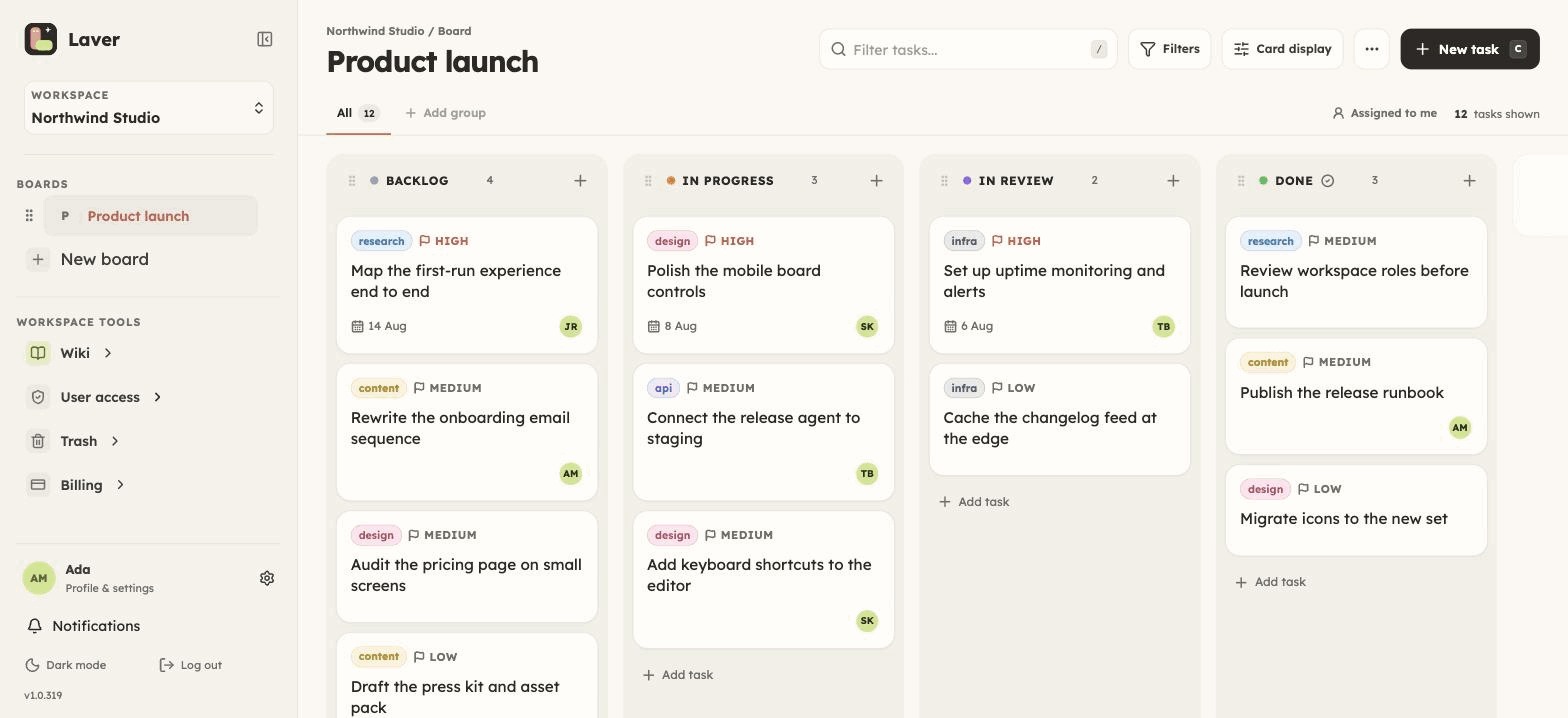
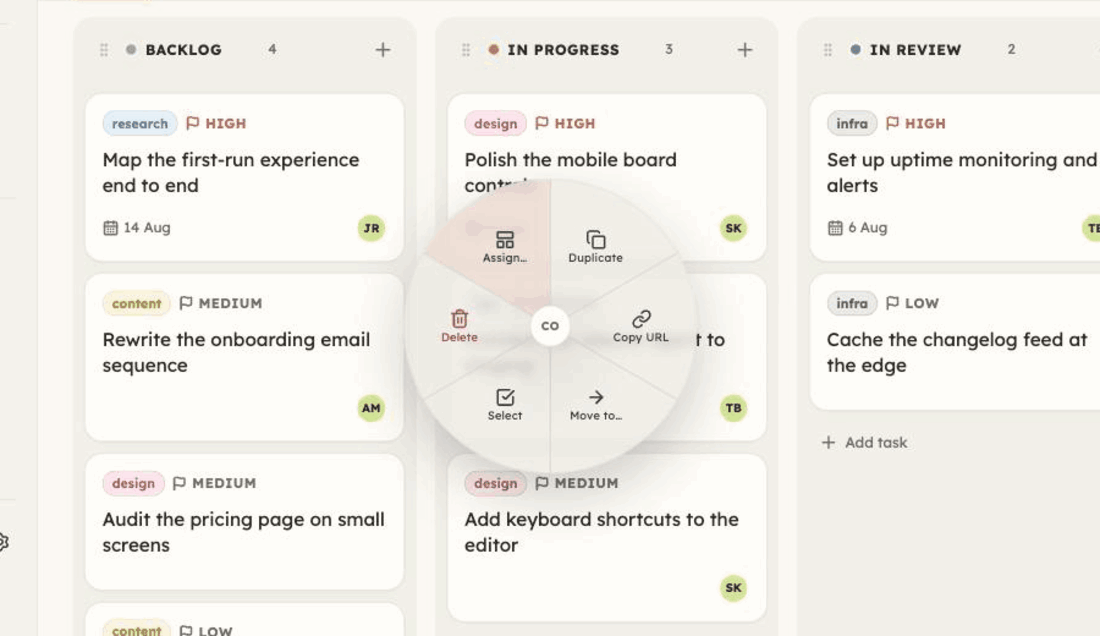
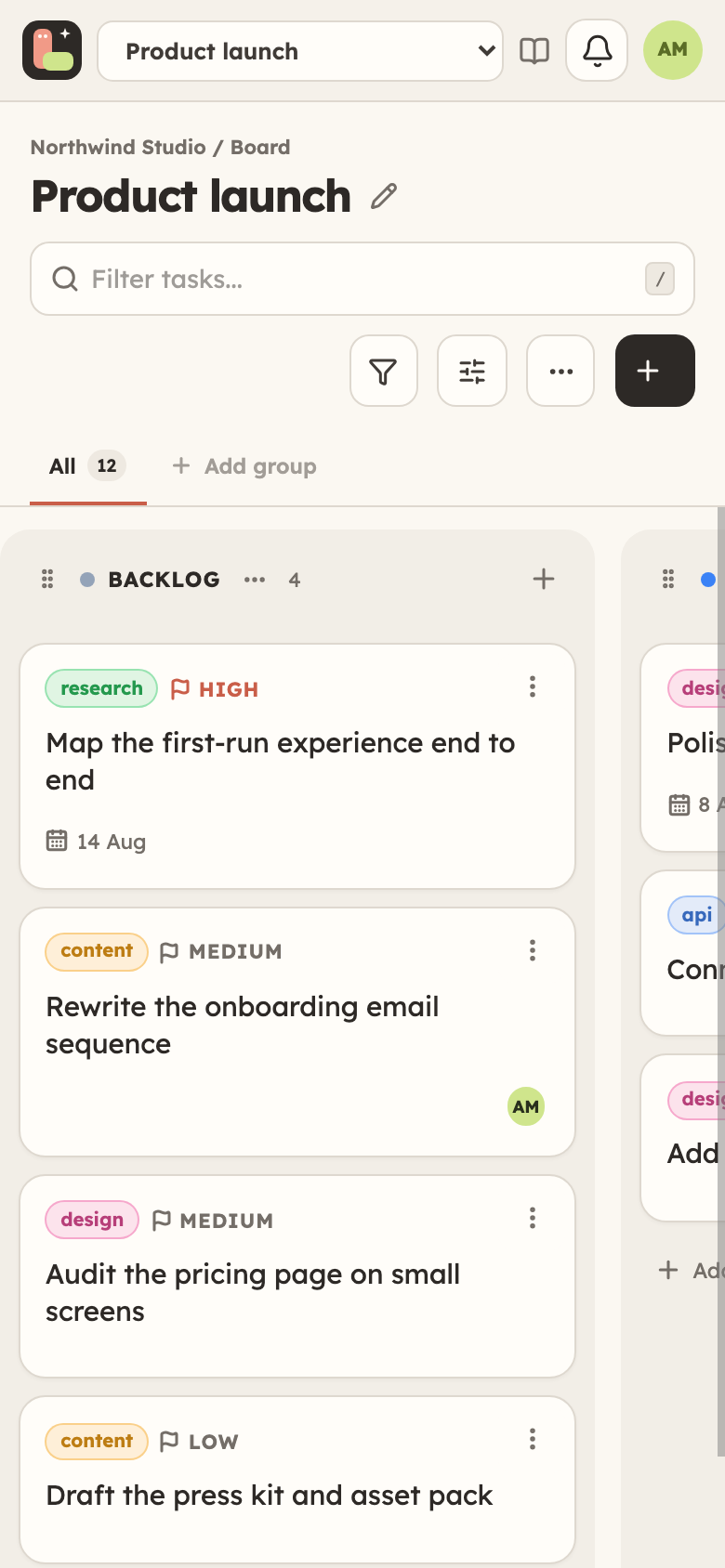
An unaltered capture of the running Laver interface, using a fictional demo workspace.
FROM THE FOUNDER
Why Laver was built
I built Laver because project management had stopped being fun. Every tool I tried had fifty features and my team used six of them; the rest seemed to be there to justify the invoice.
So Laver keeps the handful that actually do the work — boards, sprints, a wiki, and an API your agents can drive — and puts them on one paid plan rather than five, with a free tier underneath it. You pay for the people doing the work, and nobody else.
01 / THE IDEA
Project management should clarify the work, not become the work.
Laver gives your team enough structure to stay aligned without turning every update into a ceremony. Plan in boards, work in sprints, document decisions, and let automation handle the repetitive parts. See how that plays out over a week in project management for small teams.
02 / WHAT YOU GET
Everything connected.
Nothing in the way.
A complete project workspace with fewer tabs, fewer status meetings, and a clear path from idea to done.
BOARDS + SPRINTS
Shape a workflow that fits the team.
Configure statuses, run repeating sprints, filter the view, and roll unfinished work forward without rebuilding a board. Start from a board template or save your own, hold a column to entry requirements before a ticket may enter it, and let a routine ticket repeat on its own schedule. The stats view then measures what happened rather than what was estimated: cycle time, weekly throughput, and where work is queueing.
API + AGENTS
Give automation a proper seat at the table.
Workspace-scoped API keys, optimistic concurrency, and polling-friendly deltas let agents work safely beside your team.
curl -X PATCH https://api.laver.app/tasks/7f2a…
  -H "Authorization: Bearer $LAVER_API_KEY"
-d '{"version": 4, "status": "In progress"}'TEAM WIKI
Keep the context beside the work.
Build a searchable, nested knowledge base for briefs, decisions, and runbooks without leaving the workspace. Pages and ticket descriptions are edited live — two people in the same page see each other's cursor and name rather than overwriting each other.
Boxes and arrows go in the page itself: type /diagram and draw. Diagrams live in the document rather than as a file beside it, so they copy with the text, sit in the version history and are edited by anyone who can edit the page.
AUTOMATIONS
Rules that move the board for you.
Build "when this happens, do that" on the board itself — triggers, conditions and actions, no code. Every run is logged with what it changed, and 2 rules per board are included on the free plan.
Automation rulesSHARE OUTWARD
Let the outside see exactly enough.
Publish a board as a read-only roadmap — columns and ticket titles, nothing else — or a single wiki page to a link. Collect work from people with no account at all through a feedback form that files straight onto a board.
CONTROL
Access that matches responsibility.
Owners, admins, members, viewers, commenters and guests get clear permissions, with board-level access when a workspace needs finer control — and a guest sees only the boards they were named on. Each account can hold its own sign-in behind two-factor authentication.
A password a colleague needs goes in shared secrets instead of a chat message: you choose who may reveal it, every reveal is in the audit log, and nobody else in the workspace can read it — administrators included.
Shared secretsSIGN-OFF
Send a document out to be signed.
Email a wiki page to one person for signature and they sign it in the browser — no account, and no sight of the rest of your workspace. Mark the blanks while you write the page: a company name, a date, a signature they draw. Both sides keep a PDF of what was agreed, every request is in the audit log, and the link expires after thirty days.
Document signaturesCAPTURE
File the bug from the page it is on.
The browser extension opens over whatever you are looking at and files a ticket with the screenshot, a recording of the tab and the URL already attached — point at the element you mean and it crops to that. It loads unpacked from the Laver repository rather than the Chrome Web Store, and signs in with an API key you can revoke.
The browser extensionFIND ANYTHING
One box for the whole workspace.
Press ⌘K anywhere and search every board, ticket, comment and wiki page you are allowed to open, in one ranked list. Paste a ticket ID or a link and it goes straight there. Going the other way, a quick note is a private scratch pad you can open from any screen and close again without losing your place.
Search the workspace03 / SIMPLE PRICING
Start free.
One plan when you grow.
Start on the free plan with no card. Paying lifts the limits — pay only for the people doing the work, and invite as many viewers as you need.
LAVER / PRO
THE COMPLETE WORKSPACE
All the structure.
One step up, not five.
Boards, repeating sprints, tickets, team knowledge, and agent-ready APIs in every workspace, free one included. Paying lifts the limits rather than unlocking the basics.
Free to start One workspace, 3 boards, 100 MB · no card.
Upgrade when you outgrow it.
Create your workspace £2.99/ seat / month
incl. VAT · billed each month £2.49 net + £0.50 VAT£23.99/ seat / year
incl. VAT · £2.00 / seat / month, billed annually £19.99 net + £4.00 VATA team of 5 pays £14.95 a month, or £119.95 a year, VAT included.
Viewers are free, and so are commenters and read-only guests. Active owners, admins, members, and editing guests count as billable seats.
- Unlimited boards
- Unlimited seats
- 10 GB storage per seat
- Repeating sprints
- Connected team wiki
- Real-time editing
- Outbound webhooks
- Agent-ready API keys
- Unlimited automation rules
- Published board roadmaps
- Public feedback forms
- MCP server for assistants
The free plan needs no card and has no deadline; it is limited to one workspace, 3 boards, 3 billable people and 100 MB, and does not include guests from outside your workspace, published pages or private pages. The paid plan takes a card at checkout and your chosen billing rhythm begins straight away; cancel any time. Prices are in British pounds and include UK VAT at 20% — £2.49 per seat per month, or £19.99 per year, before it. Checkout works the tax out from your billing address, so a business entering a VAT number, or a customer outside the UK, may pay a different total. Storage is pooled across the workspace at 10 GB per billable seat; once the pool is full, new uploads are refused until you clear space or add a seat. Nothing is ever deleted.
04 / QUESTIONS
The things people ask
before they start.
The answers that usually take a sales call, given before you have to ask for one.
What is Laver?
A project management workspace for a small team: kanban boards, repeating sprints, tickets with comments and attachments, and a team wiki, all under one membership list. Everything a person can do to a board, an agent can do through the same API.
Who is Laver not for?
It suits three to thirty people who want a board today rather than a configuration project. Tickets carrying dates draw a timeline whose bars you can drag to reschedule, and that is where planning stops: no resource planning and no critical path, so a team that needs those is better served by something heavier than this.
How long does it take to set up?
Minutes. A new board arrives with Backlog, In progress and Done columns and takes tickets straight away — labels, custom fields, sprints and automation rules are there when you want them and out of the way until you do. There is nothing to install and nothing to configure first.
Is there really a free plan?
Yes, and it has no deadline and needs no card. One workspace, 3 boards and 100 MB of storage for up to 3 billable people, with boards, repeating sprints, the team wiki, feedback forms, 2 automation rules per board and agent-ready API keys included. Guests from outside your workspace, private wiki pages, published pages and published board roadmaps are on the paid plan, which is £2.99 incl. VAT per seat per month.
Who counts as a paid seat?
Active owners, admins, members and editing guests. Viewers, commenters and read-only guests cost nothing and are unlimited, so the people who only need to read the board — or to say something about it — never reach the invoice. Deactivating somebody stops billing for that seat.
Can I bring work over from another tool?
Yes. The importer reads a Trello, Jira, ClickUp or Microsoft Planner export, or a spreadsheet of your own that you map column by column. Columns, tickets and labels come across, and importing the same file again updates what it already brought in rather than making a second copy of it.
Does Laver work on a phone?
It is a responsive web app, so the board, tickets and the wiki all work in a phone browser — the board swipes one column at a time and a long press picks a ticket up and moves it. Your browser can install it to your home screen or your desktop, which gives it an icon and a window of its own.
Can an AI agent work on my board?
Yes, on both plans and without an add-on. A workspace-scoped API key gives an agent the same REST API the app itself uses, every ticket carries a version so two writers cannot silently overwrite each other, and there is an MCP server for the assistants that speak it.
Can I get my work back out?
Any board exports as a spreadsheet of its tickets, ids included, and that same file imports back into Laver — so an export is a working copy of the board rather than a dead archive. There is no minimum term on either plan, and you can cancel from the same place you subscribed.
Pricing goes further on seats, VAT and what the free plan includes; the documentation covers how each part works, and trust covers security and where your data lives.
READY WHEN YOU ARE
Make space for the work
that actually matters.
Set up your first workspace and board in minutes. The free plan needs no card and has no deadline.
Create your workspace