You are six people, not six departments. What you need is one place
where the board, the writing around it and the jobs nobody wants to do
by hand all sit under the same list of names — and nothing to configure
before you can use it. That is the whole of Laver.
Free for one workspace, 3 boards and 100 MB · £2.99 incl. VAT
per seat per month beyond that · viewers are free
THE REAL THING
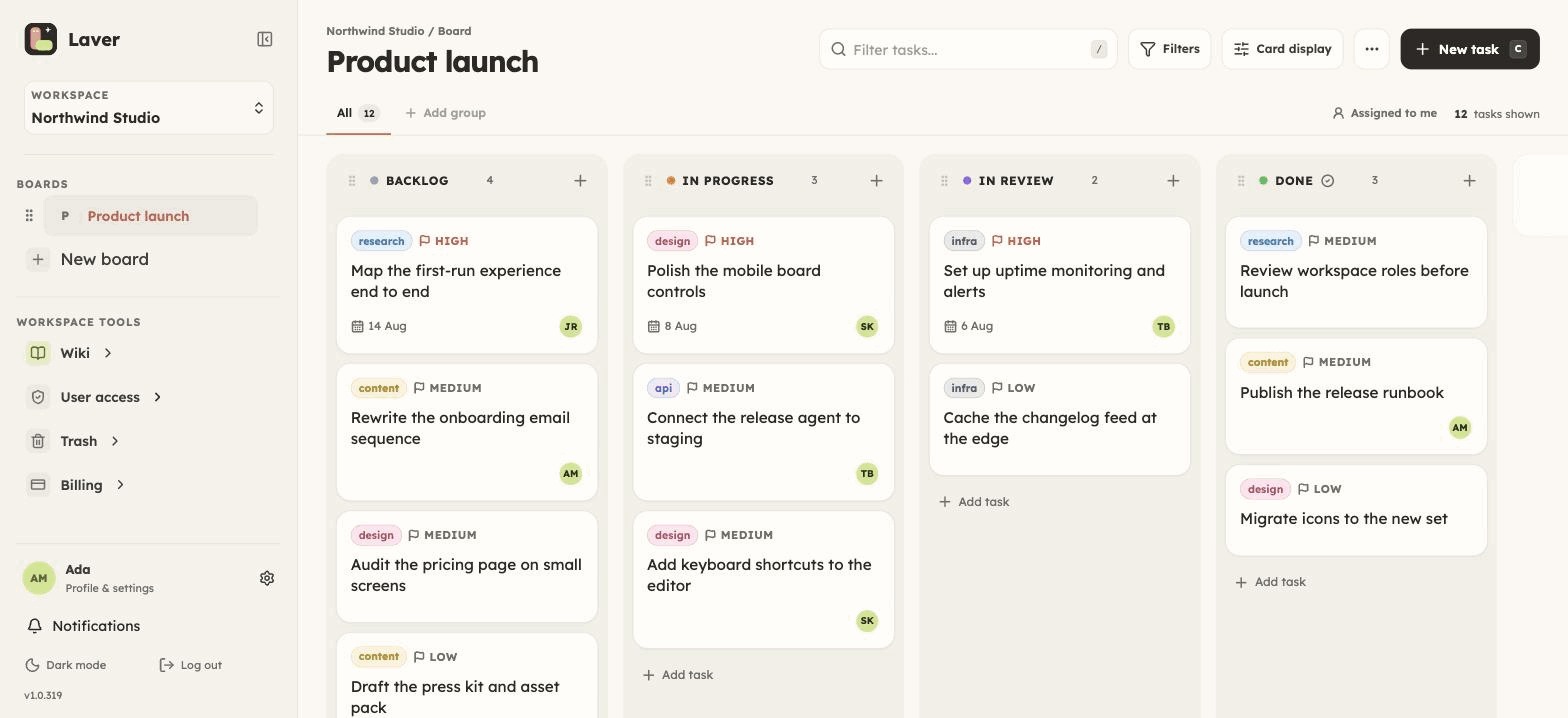
This is the actual board.
Not a mock-up, not a redraw: a screenshot of the running app. The
team on it is invented, because nobody's real tickets belong on a
marketing page.
Captured from the running product · August 2026
Everything a small team actually uses
Kanban boards
Repeating sprints
Team wiki
Automation rules
Public roadmaps
Agent API
ONE WEEK, ONE TEAM
How a six-person team runs a release.
A week, in the order it actually happens. Nothing below is planned
or nearly ready — it is what you get if you sign up this afternoon.
01
The work goes on one board
One board per project, with columns named the way your team
already talks: Backlog, To do, In progress, Deployed. Open a ticket and the
whole of it is in one place — who has it, what it is for, the
dates, the checklist, the labels, the argument in the comments,
the file somebody dragged in, and a record of everything that
changed. You tell Laver which column means finished, and the
rest of the product counts from there.
Make the board repeat — every 7, 14 or 21 days, or any stretch
from 1 to 90. When a sprint closes, Laver opens the next one for
you: same columns, same groups, same people, unfinished tickets
carried across, finished ones left where they are. The board you
just closed is the record of that cycle, which is why nobody
spends Friday afternoon writing one.
The wiki is a tree of pages belonging to the workspace rather
than to any one board, so every member can read it — searchable,
with history and attachments, and any page can be made private
and shared with named people instead. The brief, the runbook and
the reason you picked the thing you picked end up next to the
tickets they produced.
Two of you can write the same page at the same time, each
watching the other's cursor move with their name on it. Ticket
descriptions behave the same way, because it is the same editor.
Every board carries its own automation rules, built in the app
rather than in a config file. When a ticket lands in Deployed, drop the label and comment on it. Every
Monday at 09:00, put up the release checklist. When something
has sat in Review for three days, hand it back and raise its priority.
A rule is a trigger, some conditions if you want them, and actions
picked from a list Laver defines — and every run is written down with
what it touched.
2 rules per board on the free plan, as many
as you like on the paid one.
Publish a board as a read-only roadmap and it becomes a link
with your columns and your unarchived ticket titles on it — no
descriptions, no comments, no assignees, no dates. A single wiki
page publishes the same way. Both are paid, both are one object
at a time, and an owner can switch either off for the whole
workspace.
In the other direction, a feedback form takes tickets straight
onto a board from people who have no account at all, on either
plan. Anyone who needs more than a glimpse comes in as a guest,
held to the boards you name.
Anyone can issue themselves a workspace-scoped API key. It acts
as the person who made it and inherits their board access, so
there is no second permission model to keep in your head. Every
write says which version it expects, which is what makes an
agent and a person safe on the same board at the same time.
If the assistant is the client there is nothing to write at all: @laver/mcp is an MCP server, so one config block and
that same key put your board in front of Claude, Cursor or anything
else that speaks MCP.
Laver is small and opinionated on purpose: one way to look at a
board, a fixed set of fields on a ticket, one home each for people,
billing and documentation.
A good fit when
Who is doing what changes by the day, and everyone should be
able to see it without asking.
There are three to thirty of you and you want a board today,
not a configuration project.
The thinking behind the work keeps getting lost in chat.
You want agents filing and moving tickets on the same board
as everyone else.
Not what it is
A spreadsheet, or a document editor wearing a hat.
A full project-planning suite. Tickets carrying dates get a
timeline whose bars you can drag to reschedule, and that is
where it stops: no resource planning, no critical path.
A public site. Access goes per workspace and per board, and
nothing you write can be read without a login unless you
publish it on purpose — a board as a read-only roadmap, a
single wiki page, or a feedback form that collects tickets
for one board.
WHAT IT COSTS
£2.99 incl. VAT per seat, per month.
Or £23.99 a seat if you pay for the year, on top of a free plan that asks
for no card at all — one workspace, 3 boards and
100 MB. There is one paid tier rather than five, and paying
lifts the limits instead of unlocking the basics. Viewers are free, and
so are commenters and read-only guests. Active owners, admins, members
and editing guests count as billable seats. Prices are in British pounds
and include UK VAT at 20%; checkout works the tax out from
your billing address.